My wife summarized how this process of selling our house is going:? Somewhere between what works for you and what works for me is the right answer.? You would just give them the keys, and I’m saying, “Out of my face–I’ll burn down this house before I sell it to you for that.”
Windows Mobile Feature Comparison by Version
Thanks to Rod Trent at myITforum.com for pointing out this comparison (from Microsoft) of the various versions of Windows Mobile. The table has 61 rows of various features, and then shows which versions of Windows Mobile 5.0, 6.0, or 6.1 (with touch screen or without) have the feature.
I only recently learned that you get fewer features if your phone doesn’t have a touch screen! And I’m supposed to know it all.
Now I just need to find a comparison between Palm Activesync and what you get with Windows Mobile…
Amazing Simple Home Remedies
Making the rounds on the Internet…
AMAZING SIMPLE HOME REMEDIES
- Avoid cutting yourself slicing vegetables by getting someone else to hold them while you chop.
- Avoid arguments with the Mrs. about lifting the toilet seat by using the shower.
- For high blood pressure sufferers: simply cut yourself and bleed for a few minutes, thus reducing the pressure in your veins.? Remember to use a timer.
- A mouse trap, placed on top of your alarm clock, will prevent you from rolling over and going back to sleep after you hit the snooze button.
- If you have a bad cough, take a large dose of laxatives, then you will be afraid to cough.
- You only need two tools in life – WD-40 and Duct Tape.? If it doesn’t move and should, use the WD-40.? If it shouldn’t move and does, use the duct tape.
Anja’s First Model Rocket Launch
My friend Tom invited us to a Rocketry of Orlando’s Community Kids launch event on Saturday at the Little Big Econ State Forest (non-members pay a small fee to launch). We picked up a rocket at Walmart on Friday and got it ready. It was a little windy, but we had a great time!
At left you’ll see that we had a successful launch!
Check more of my photos on Flickr.
Calculate Rate of Return When You’ve Added or Removed Money
At the beginning of each year, I like to calculate the rate of return of each of my accounts for the previous year. If I haven’t added to or subtracted from an account, that’s as easy as (gain or loss) divided by initial investment. So, if I started with $10,000 and ended up with $12,000, my return was $2000 / $10000 = 0.20, or 20%.
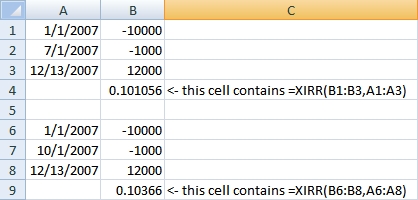
But what if I added $1000 at some point during the year? Depending on when I added the $1000, it would be contributing various amounts to my return. This is where Excel’s XIRR function becomes very handy (other spreadsheets have it too). The XIRR function is used to determine the rate of return with irregular payments (IRR can be used if the payments are on a regular schedule).
I found a good explanation of calculating investment rate of return here, but really like Allen Wyatt’s ExcelTips article on the XIRR function. He explains how you use the function–really, you just need to remember that money put in the account is expressed as negative numbers, and money pulled out of the account (or remaining at the end) is a positive. You give the XIRR function the dates and amounts for the start, payments/withdrawals, and ending value, and it gives you a rate of return.
Notice in the following example how I started with $10,000, added $1000, and ended up with $12,000. Depending on when I added the $1000, the return varied from 10.1% to almost 10.4%.
Allen Wyatt has WordTips and ExcelTips that are searchable. Check out www.vitalnews.com.

When You Can’t Turn On or Off Windows Firewall
I’ve bumped into this problem several times, and seem to forget the answer, so this is as much to remind me as for anyone else…

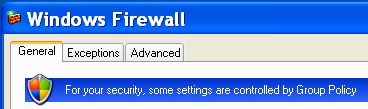
If you’re trying to manage the Windows XP firewall and the controls are grayed out, and you see the message “For your security, some settings are controlled by Group Policy”, the answer could be as simple as “you installed Windows Live OneCare”.
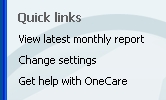
When you install Windows Live OneCare, it takes over the firewall settings.? To manually make changes, go to Start – Windows Live OneCare (or just click on the OneCare icon in the tray), then click the “Change settings” quick link.? From there you’ll have access to your firewall settings.

More Laura Chappell Goodness
I’ve said before that I’m a fan of Laura Chappell’s training on network traffic / protocol / packet analysis.
I didn’t even know about all of the screencasts available from the site of Novell’s Connection magazine.? Check them out!
Scripts and Events on Cisco Routers
Did you know that Cisco routers have TCL and an Embedded Event Manager (EEM) that can trigger scripts?? I’ve known that they have TCL but haven’t played with it.? The EEM makes it even more powerful.
Check out this very informative article at TechRepublic, including a link to a Cisco overviews and a Scripting Community.
Awareness Test
Amazing.
[youtube]http://www.youtube.com/watch?v=Ahg6qcgoay4[/youtube]
20 most useful Microsoft sites for IT professionals
From NetworkWorld:? a list of the 20 most useful Microsoft sites for IT professionals.? You’ll probably find at least one useful site that you didn’t know about–I found several!