I was drawn to this site by A Visual Guide to Version Control, but there are also articles about Ruby on Rails, natural logarithms, and other topics related to numbers, programming, and business and communication—all areas that I’m interested in.
Free Antivirus/Antimalware Super-Scanner
If someone sends you a file (or you download a questionable file) and you really want to be sure that the file is safe, try out VirusTotal.
VirusTotal is “a service that analyzes suspicious files and facilitates the quick detection of viruses, worms, trojans, and all kinds of malware detected by antivirus engines”. You upload or email a file to them, and they scan it with a bunch of antivirus programs.
They currently list 32 companies whose antivirus engines are used.
This is certainly not a replacement for running antivirus software on your machine, since it only scans individual files that you submit.
Cool IBM Services site
I especially like the video where you click on Solutions Menu, then click on the drive-through video link at the top.
More searching from the Firefox context menu
As much as I like the Dictionary Search Firefox extension that I mentioned in my last posting, I’ve decided that the Context Search extension gives me everything that I need, and easier.
There’s really just two steps:
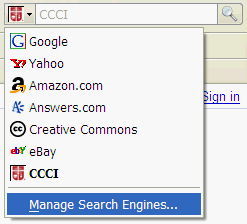
- Click on the down arrow next to the search box in the Firefox toolbar, choose “Manage Search Engines…” and then click on “Get more search engines…” to install the ones you like.
- Install the Context Search extension, which will make all of those search engines available from the context menu when you highlight a word or phrase on a web page and right-click on it.
Highlight a word, find it quickly in Google, Wikipedia, CCCI search engine, etc.
Fun with the Firefox context menu.
First, a word about the Campus Crusade for Christ search engine.
Campus Crusade has tons of resources on the web, but they can be hard to find. CCC has lots of divisions, each with many web sites. So, we’ve added a Google Search Appliance that you can use at search.ccci.org. If you use Firefox, you can add the CCC search engine to the Firefox toolbar very easily by following the instructions here.
Now that you have the CCC search engine available in Firefox, here’s a tip that I didn’t know about until a few days ago: If you highlight a word on a web page and right-click on it, the context menu will include “Search CCCI for [word you highlighted]”. Whatever search engine you have chosen in the Firefox toolbar will show up in this context menu.
What I really wanted, though, was for the context menu to show a whole list of search engines: Search Wikipedia, Search Google, etc. What I found is the Dictionary Search extension for Firefox. Once you install it, you can configure its options (under Tools, Add-ons, Extensions) to search different places. Here’s how I have my options set:
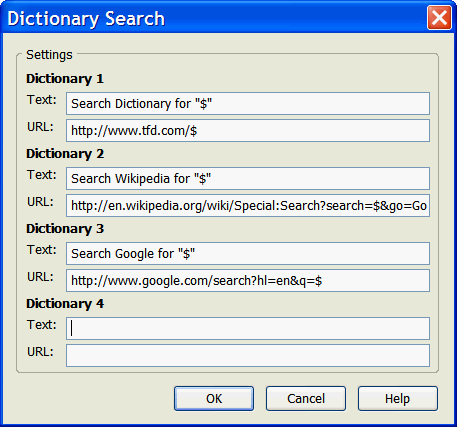
(the Wikipedia URL that extends beyond the input area is just copied from the list of dictionary URLs here).
Here’s a tip that I didn’t know when I started this post: If you don’t mind the context menu being a little deeper, you can just install the Context Search Firefox extension, and all of the search engines that you have integrated with Firefox will show up in the context menu.
Enjoy!
Marketing 2.0
Seen in the Philadelphia airport:

In case you didn’t know, 1,000 Places to See Before You Die was written by the best-selling author of 1,000 Places to See Before You Die.
Who knew?
Daniel Tammet’s incredible brain
This man can perform incredible calculations in his head, and somehow sees the numbers as shapes or colors. He can also learn a new language in a week.
A British documentary is available on YouTube. I haven’t watched all 5 parts yet, but the first one was fascinating.
ScienceHack: Cool science videos online
every science video on ScienceHack is screened by a scientist to verify its accuracy and quality
I especially like the one where a cannonball is dropped into a tank of mercury (in the Physics category).
Security Awareness Video Contest
Check out the winners of the 2007 Computer Security Awareness Video Contest conducted by the EDUCAUSE/Internet2 Computer and Network Security Task Force, the National Cyber Security Alliance, and ResearchChannel to raise awareness of and increase computer security at colleges and universities.
Quoting from the site:
The contest sought videos that explain computer security problems and specific actions college and university students can take to safeguard their computers or personal information.
Winning videos were selected for creativity, content, technical quality, and overall effectiveness of delivery. Cash prizes were awarded to winners in each category. The two gold winners received $1,000, the two silver winners received $800, and the two bronze winners received $400 in cash prizes. Five honorable mentions were also selected in each category.
Great Resources: WindowsITPro and TechNet magazines
Two magazines that regularly help me learn more about managing Windows server systems are WindowsITPro and Microsoft’s own TechNet magazine.
One reason that I love WindowsITPro is the searchable online archive. It’s worth subscribing just to get access to all of those articles.
Microsoft’s TechNet magazine is available online for free, and also contains a lot of good information. I especially enjoy the Scripting Guys. They have a column in the magazine, and you can also just go to the Microsoft TechNet Script Center.